This page is for TOMOYO 2.2 (for Linux 2.6.30 - 2.6.35 kernels). Please jump to this page for TOMOYO 2.3 (for Linux 2.6.36 and later kernels).
Last modified: $Date: 2024-03-30 20:25:00 +0900 (Sat, 30 Mar 2024) $
This page describes basic operations needed for using TOMOYO.
To initialize policy, run
| [root@tomoyo ~]# /usr/lib/tomoyo/tomoyo_init_policy |
This will take several minutes.
TOMOYO's policy files will be saved in /etc/tomoyo/ directory.
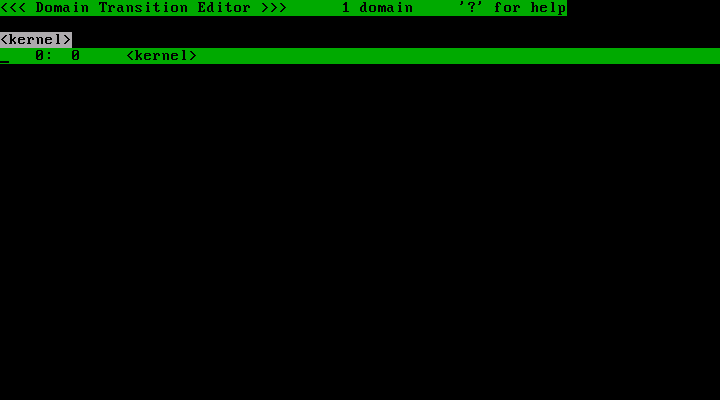
Run TOMOYO's policy editor "tomoyo-editpolicy" with "/etc/tomoyo/" option, and you will see a picture shown below.
| [root@tomoyo ~]# /usr/sbin/tomoyo-editpolicy /etc/tomoyo/ |
This picture describes the domain tree. As of now, only "<kernel>" domain is defined. But as the system runs, TOMOYO will create domains and add them to the tree. The example picture shown below has many domains.
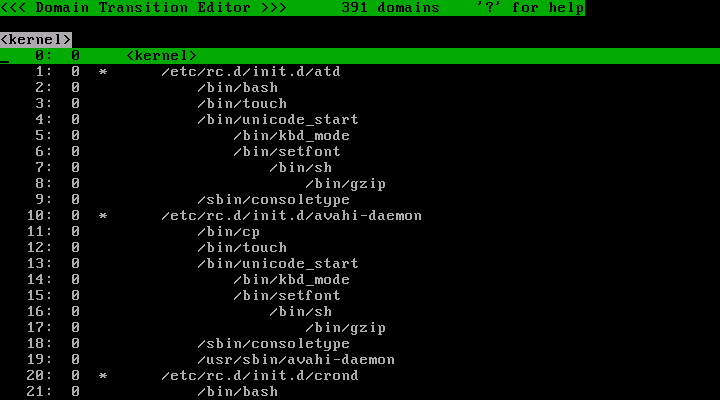
The MAC in TOMOYO Linux is applied in the units of domains. Every process belongs to single domain, and basically the process will transit to different domain whenever it executes a program. The name of a domain is a concatenated string expression for the process execution history. For example, the name of domain which the kernel belongs to is "<kernel>", the name of domain which /sbin/init invoked by the kernel belongs to is "<kernel> /sbin/init", the name of domain which /etc/rc.d/rc invoked by the /sbin/init belongs to is "<kernel> /sbin/init /etc/rc.d/rc". The exceptions of this transition rule are described later.
Look at the number which are the second column of each line.
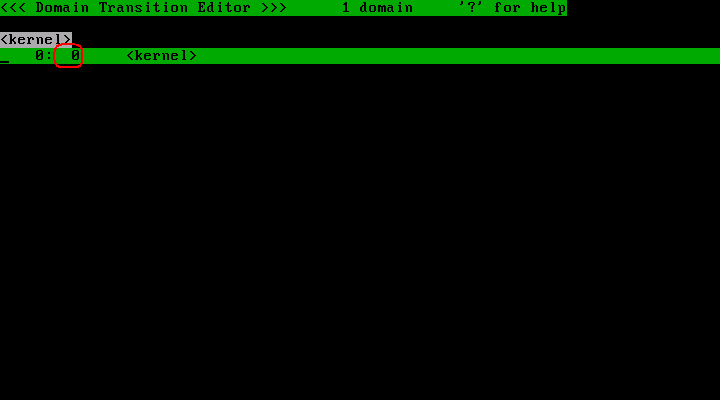
This number is called "profile number". A profile number is an integer value which takes between 0 and 255.
Press "w" key, and you will see some choices.
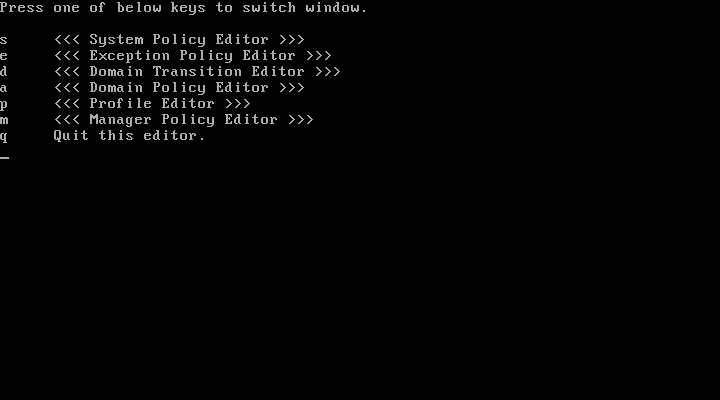
Press "p" key, and you will see the list of profiles.
You will see entries shown in below picture.
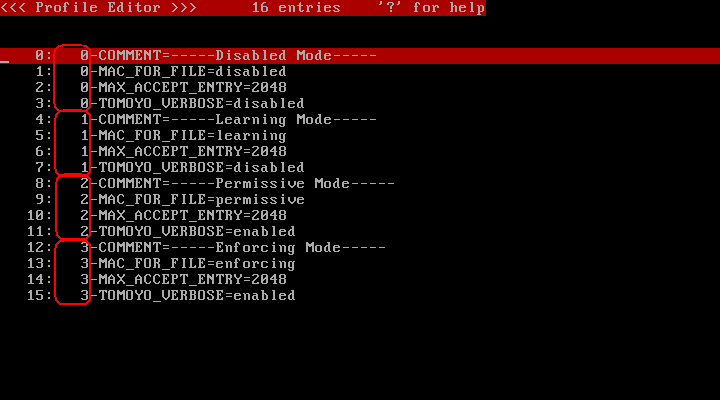
You can scroll this window using arrow keys and/or Home/End/PageUp/PageDown keys.
| Name | Control | Default value | Learning mode supported |
| COMMENT | A line of text that describes the content of the profile. | - | |
| MAC_FOR_FILE | Enable Mandatory Access Control(MAC) for files. | disabled | Yes |
| MAX_ACCEPT_ENTRY | Limits the max number of ACL entries that are automatically appended during learning mode. | 2048 | - |
| TOMOYO_VERBOSE | Dump domain policy violation messages to syslog. | enabled | - |
You can give the following values for MAC_FOR_FILE.
| Value | Meaning |
| disabled | Disabled. Works as if regular kernel. |
| learning | Learning mode. Not rejected if the request violates policy. Automatically appended to policy. |
| permissive | Permissive mode. Not rejected if the request violates policy. Not appended to policy automatically. |
| enforcing | Enforcing mode. Rejected if the request violates policy. |
You can give any integer greater or equals to 0 for MAX_ACCEPT_ENTRY.
You can give the following values for TOMOYO_VERBOSE
| Value | Meaning |
| disabled | Don't dump domain policy violation messages. |
| enabled | Dump domain policy violation messages. |
Press "w" key, then press "e" key, and you will see the picture shown below.
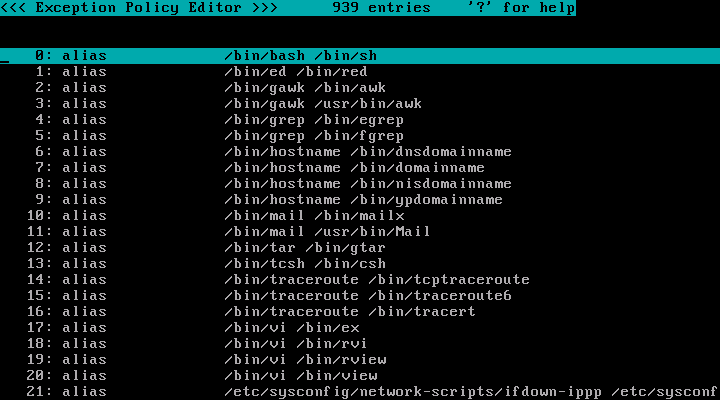
This screen contains the following types of exceptions.
| (1) Pathname pattern |
Register pathnames with patterns using the "file_pattern" directive. When a file operation is performed and the requested pathname matches a patterned pathname registered with "file_pattern" directive, policy is generated using patterned pathnames.
TOMOYO Linux needs more patterned pathnames depending on the applications installed and their configurations. You can add missing patterned pathnames after running the system. | ||
| (2) Unconditionally readable files |
Register files that are allowed to be read by all programs using the "allow_read" directive. Patterns are allowed. When a file open request for reading is issued and the requested pathname matches a pathname registered with "allow_read" directive, the open request for read access is granted even if the pathname is not explicitly permitted by the domain policy.
You may find more files depending on applications in your system or configurations. Add missing files after observing which files are used for read access. | ||
| (3) Non-rewritable files |
Register files that you don't want to allow overwriting existing contents (like log files) using "deny_rewrite" directive. Patterns are allowed. Files registered with "deny_rewrite" directive are (as long as it is not explicitly given by "allow_rewrite" directive in domain policy) forbidden to "open for writing but not append mode" and "truncate".
You may find more files depending on applications in your system or configurations. Add missing files after observing which files are used for append-only access. | ||
| (4) Programs invocable via symbolic links |
Basically, TOMOYO Linux checks execute permissions using the dereferenced pathname if the requested program is a symbolic link. But to handle programs that behave differently depending on the name of invocation, you may define domains using the name of symbolic links. | ||
| (5) Programs that cause domain transition initialization |
Register programs that initializes the domain transition history using the "initialize_domain" directive. No patterns allowed. When a program that is registered with "initialize_domain" directive is executed, the program runs just under the <kernel> domain.
You may find more programs depending on applications in your system or configurations. Add missing programs after observing which programs should be initialize their domain transition history. But be careful with the side effect of other domains. For example, when the domain policy already includes
and you add /bin/tcsh as initialize_domain, "<kernel> ... /bin/bash /bin/tcsh" will become unreachable domain because /bin/tcsh runs in "<kernel> /bin/tcsh" domain. In that case, you will need to replace "<kernel> ... /bin/bash /bin/tcsh" with "<kernel> /bin/tcsh" as shown below.
| ||
| (6) Programs that prevent domain transition initialization |
To deny the effect of "initialize_domain" directive under specific conditions, use "no_initialize_domain" directive. | ||
| (7) Domains that prevent domain transition |
To declare domain keepers, use "keep_domain" directive followed by domain definition. | ||
| (8) Domains that cause domain transition |
To deny the effect of "keep_domain" directive under specific conditions, use "no_keep_domain" directive. |
Press "q" key to finish the policy editor.
Please see the policy editor's tutorial page How to use Policy Editor as needed.
Now, reboot with TOMOYO Linux kernel.
| [root@tomoyo ~]# reboot |