
Chapter 12: Reinforced authentication
12.1. Illegal SSH logins
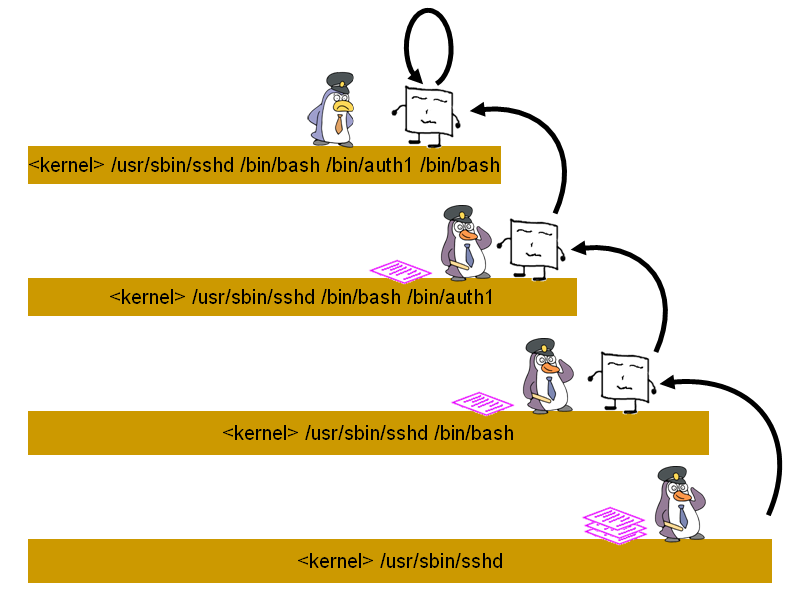
Illegal logins can occur for example through SSH brute force attacks, or through vulnerabilities in other Internet-facing services. It is possible to add another layer of defence using a tiered authentication system. Using TOMOYO Linux, you can enforce login authentication as many times as you want. Suppose we create the following script:
#! /bin/sh -p
read -r -s -e -p "Password: " password
sleep 2
if [ "$password" = "123456" ]; then
  exec $SHELL
else
  echo "Authentication failed."
fi
Call this script "auth1", make it executable and place it in "/bin/" directory. This is only an example script, but it does not matter that the password is in plaintext as the attacker can be denied from reading the script. See 12.3. Example authentication programs for more examples. Suppose we have the following in exception policy:
initialize_domain /usr/sbin/sshd from any
Now we can manage the domain "<kernel> /usr/sbin/sshd /bin/bash", but make sure that the keep_domain directive is not specified for this domain. Use domain policy to restrict this domain and only allow the execution of the "auth1" script, but no other programs:
file execute /bin/auth1 exec.realpath="/bin/auth1"
Following login through SSH, the user must go through another authentication mechanism. If this is an illegal login from an attacker, then they will not be able to know what the authentication mechanism is. Ths script above can employ as foreign an authentication mechanism as you desire.
The domain created following successful authentication can be given normal privileges, and for example may be given the entry below in exception policy:
keep_domain any from <kernel> /usr/sbin/sshd /bin/bash /bin/auth1 /bin/bash
12.2. Splitting root permissions
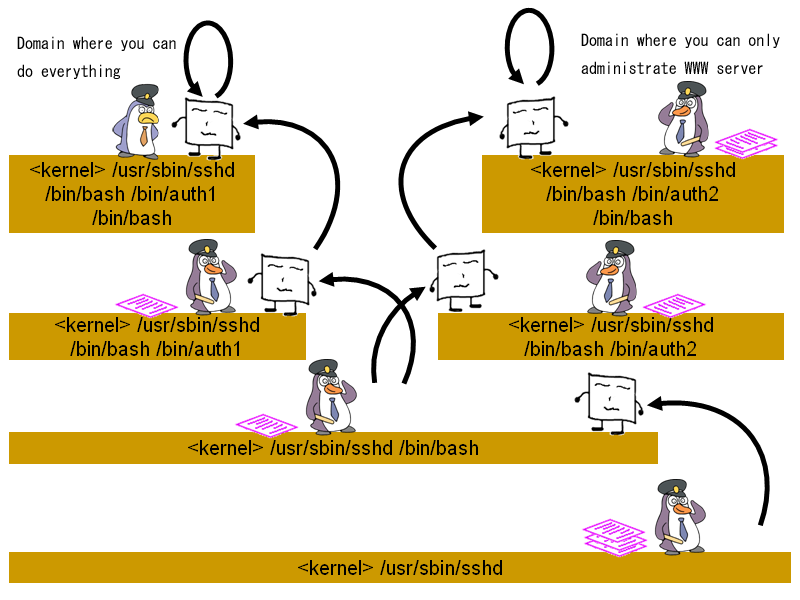
Using this tiered approach, it is also possible to split root permissions. The script can be repeated with a different password and saved as "/bin/auth2". The domain created by execution of "auth1" can be given maximum privileges using domain policy, but the domain create by execution of "auth2" can be given limited privileges, such as to administrate only the web server:
12.3. Example authentication programs
This example script is the same as above, but stores the password as a hash:
echo "password" | sha1sum
c8fed00eb2e87f1cee8e90ebbe870c190ac3848c -
#!/bin/sh -p

hash="c8fed00eb2e87f1cee8e90ebbe870c190ac3848c  -"

read -r -s -e -p "Password: " password
hash_attempt="$(echo "$password" | sha1sum)"
sleep 2
if [ "$hash_attempt" = "$hash" ]; then
  exec $SHELL
else
  echo "Authentication failed"
fi
Example authentication programs are listed below. But these programs exist only as examples of how you might design unique authentication methods. Some of the algorithms are poor and should not be used in a production environment. The source code for these programs can be found in our subversion repository.
candy | This authentication program succeeds if the correct password is typed, but only if the program is launched within 10 seconds of the parent process (e.g. "/bin/bash") being launched. If the program is not launched within this time period, then all password attempts will fail. This is useful in preventing brute force attacks, and the attacker will not know that no attempt can succeed. |
chaplet | This authentication program displays a string of challenge data, and authentication will succeed only if the numerical characters from the challenge data are typed. This is only an example and the algorithm is poor. It should be customized before use in a production environment. |
checktoken/gettoken | These authentication programs use tokens based on system time. The |
groovy | This authentication program prompts for a password, but does not check the password. Instead, it checks for the existence of the file "/tmp/.lockme", succeeding only when this file does not exist. This can prevent brute force attacks. This is only an example and uses a file location that is apparent to attackers. It should be customized before use in a production environment. |
honey | This authentication program fails unless the correct password is typed within the correct time interval. This can prevent brute force attacks. |
mailauth | This authentication program generates a one-time password and sends it to the user using |
timeauth | This authentication program is a reimplementation of |
Also, the examples below can be useful when you use reinforced authentication:
falsh | This is a very restricted shell with no built-in commands. Since login shell such as /bin/bash provides many built-in commands such as |
proxy | This is a simple port forwarder program. This program can be used by the client to bind to a specific local port on the server so that the server-side firewall, such as |